
WhatsTeam
  • Product
    • All Features
    • Integrations
    • Campaigns
    • Team Inbox
    • AI Agents
    • Team Permissions
    • WhatsApp Business API
  • Solutions
    • All Solutions
    • E-commerce & Retail
    • Healthcare
    • Real Estate
    • Education
  • Pricing
  • Developers
  • Resources
    • Blog
    • Compare Alternatives
    • Free Tools
    • Help Center
  • Create an account
  • Log in
WhatsTeamWhatsTeam
  • Features
    WhatsApp AI Platform for Teams

    Team inbox, AI agents & automation for WhatsApp

    Core Platform
    Campaigns
    Campaigns

    Broadcast messages & marketing automation

    AI Agents
    AI Agents

    Intelligent WhatsApp automation agents

    CRM Platform
    CRM Platform

    Shared WhatsApp inbox for your team

    Team Permissions
    Team Permissions

    Control what each agent can see and do

    View all features
    Business Tools
    WhatsApp Business API
    WhatsApp Business API

    Official API with team inbox included

    Integrations
    Integrations

    Connect with 500+ apps and platforms

    MCP Server
    MCP Server

    Connect AI assistants to WhatsApp

    Analytics & Reports
    Analytics & Reports

    Message stats, agent performance & response times

    View all tools
    Get Started
    • Talk to Sales
    • Help Center
    • Blog
    What's New
    • Product Updates
    • Latest Features
    • Case Studies
    Start Free Today

    14-day trial. No credit card required.

    Start Free Trial →
    • 500+ Integrations
    • API Documentation
    • Case Studies
  • Solutions
    WhatsApp Solutions for Every Industry

    Discover how WhatsTeam helps businesses grow with WhatsApp

    By Industry
    • E-commerce & RetailAbandoned carts, order updates, customer support
    • HealthcareAppointments, reminders, patient communication
    • Real EstateProperty alerts, virtual tours, lead follow-up
    By Use Case
    • EducationStudent engagement, enrollment, parent updates
    • Customer Support24/7 automated and live agent support
    • MarketingCampaigns, promotions, lead generation
    WhatsApp Business
    • WABA PricingCalculate WhatsApp API costs by country
    • WABA MigrationMigrate from WhatsApp App to API
    • Become a PartnerWhite-label reseller program
    • Referral ProgramEarn 30% commission per referral
    Get Started
    • Talk to Sales
    • Free Tools
    • Blog
    What's New
    • Product Updates
    • Help Center
    Start Free Today

    14-day trial. No credit card required.

    Start Free Trial →
    • All Solutions
    • Compare Alternatives
    • View Pricing
  • Pricing
  • Blog
  • Free Tools
  • Log in
Sign up
Shared WhatsApp Inbox

One WhatsApp Number, Your Entire Team

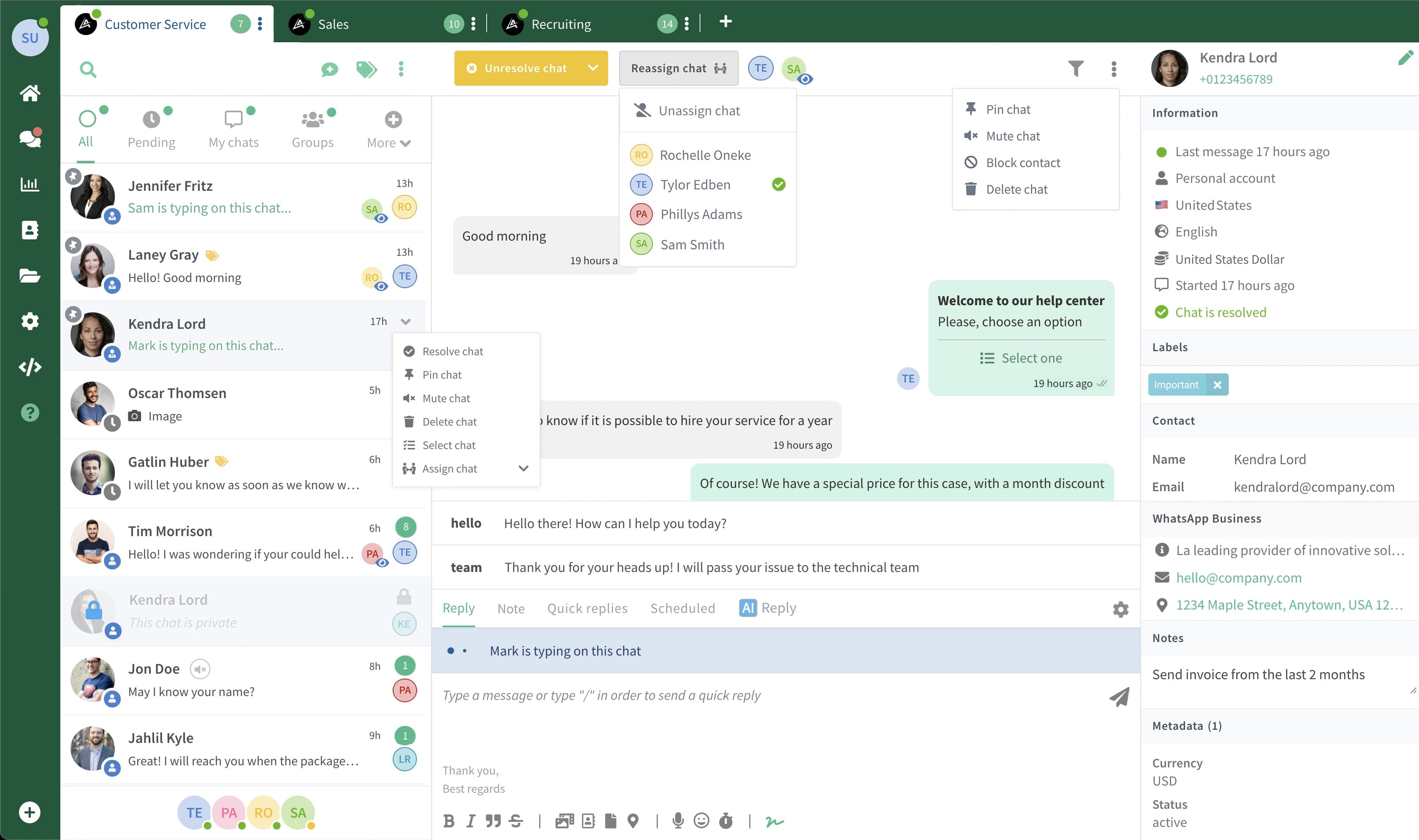
Your team shares one WhatsApp number. Right now that means chaos — missed messages, duplicate replies, zero visibility into who said what. WhatsTeam gives every agent their own seat in a single shared inbox.
Start Free TrialSee Pricing
WhatsApp Team Inbox Dashboard
The Problem

Sound Familiar?

Without a shared inbox, teams sharing one WhatsApp number face these problems daily

Passing the Phone Around

One phone, multiple people. Someone has to physically hand over the device or log in and out of WhatsApp Web. Messages pile up during the handoff.

Duplicate Replies

Two agents see the same unread message and both reply. The customer gets confused, your team looks unprofessional, and nobody knows who owns the conversation.

Zero Accountability

No record of who said what, no response time data, no way to track if conversations were resolved. When something goes wrong, there is no trail to follow.

Up to 12

Agents

on one WhatsApp number

Auto

Assignment

conversations routed automatically

Real-time

Collision Prevention

see who is typing

Full

History

every message, searchable

How It Works

From Setup to First Conversation in Minutes

1

Connect Your WhatsApp Number

Link your WhatsApp Business number through the WhatsApp Business API. The guided setup takes about 5 minutes.

2

Invite Your Team

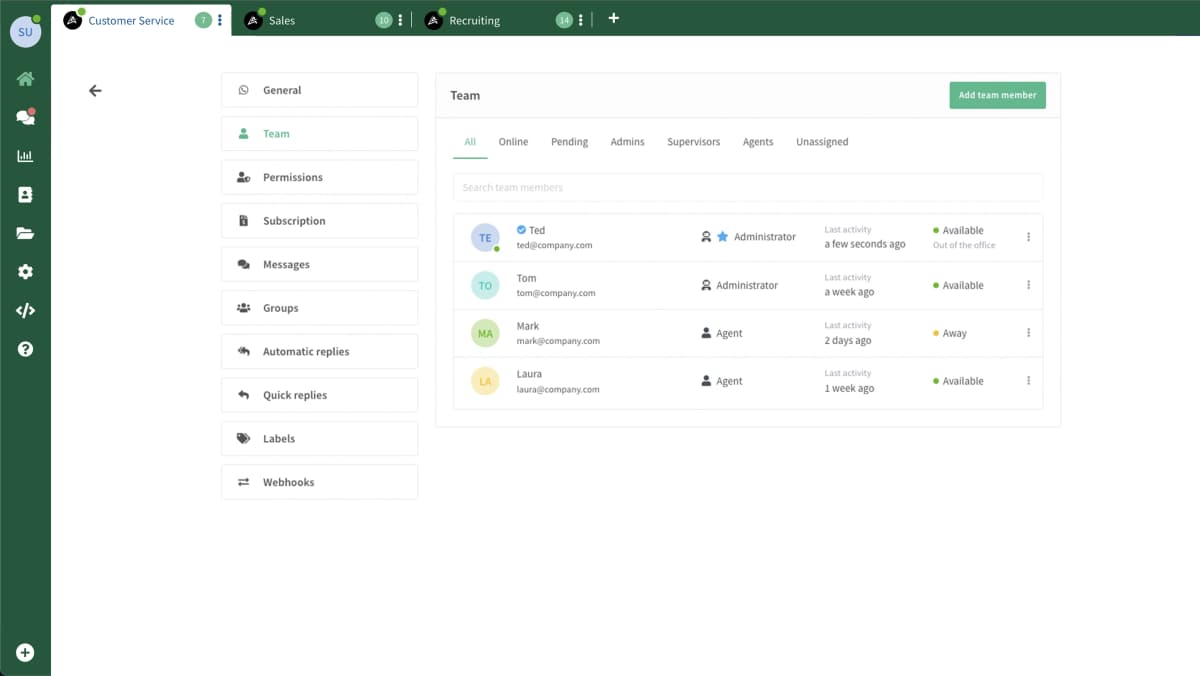
Each agent gets their own login. Set roles, create departments (Sales, Support, Billing), and define assignment rules.

3

Start Handling Conversations

Incoming messages are automatically distributed to available agents. Collision prevention keeps things clean — no duplicate replies.

Features

What You Get

Every tool your team needs to handle WhatsApp conversations without stepping on each other

Unified Inbox

All WhatsApp conversations in one dashboard. Every agent sees the full queue from their own screen — no phone sharing, no app switching.

Smart Assignment

Auto-assign new conversations to available agents. Round-robin for equal distribution, load-based to balance workloads, or let agents claim manually.

Collision Prevention

Real-time typing indicators show when another agent is already responding. No two people answer the same message.

Internal Notes

Add private notes to any conversation. When you hand off a chat, the next agent sees your notes — the customer never does.

Tags & Labels

Tag conversations by topic, priority, or status. Filter your queue to show only your department's open conversations.

Performance Analytics

Track response times and see which conversations need attention. Available on Business and Enterprise plans.

Why Teams Switch to WhatsTeam

Replace the chaos of phone sharing with a system built for teams
Never Miss a Message

Never Miss a Message

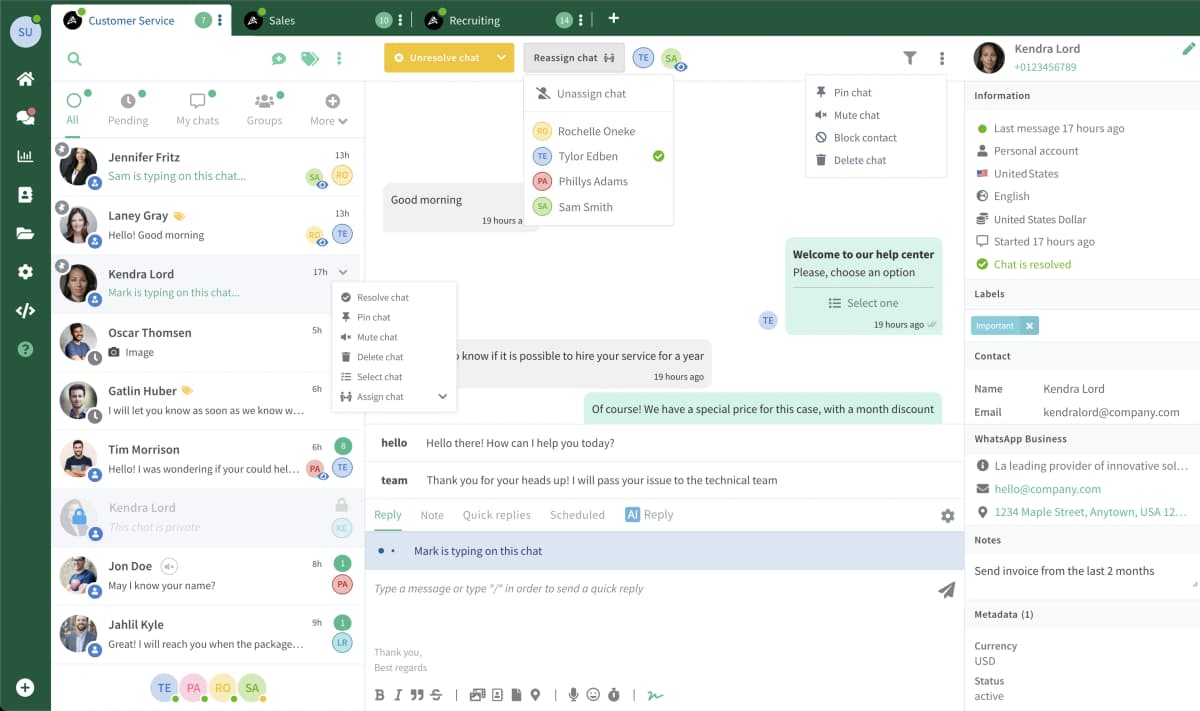
With multiple agents online, customers always get a response — even across timezones and shift changes. When one agent logs off, unfinished conversations are automatically reassigned.
  • Real-time message sync
  • Automatic reassignment on disconnect
  • Queue management
Control Who Sees What

Control Who Sees What

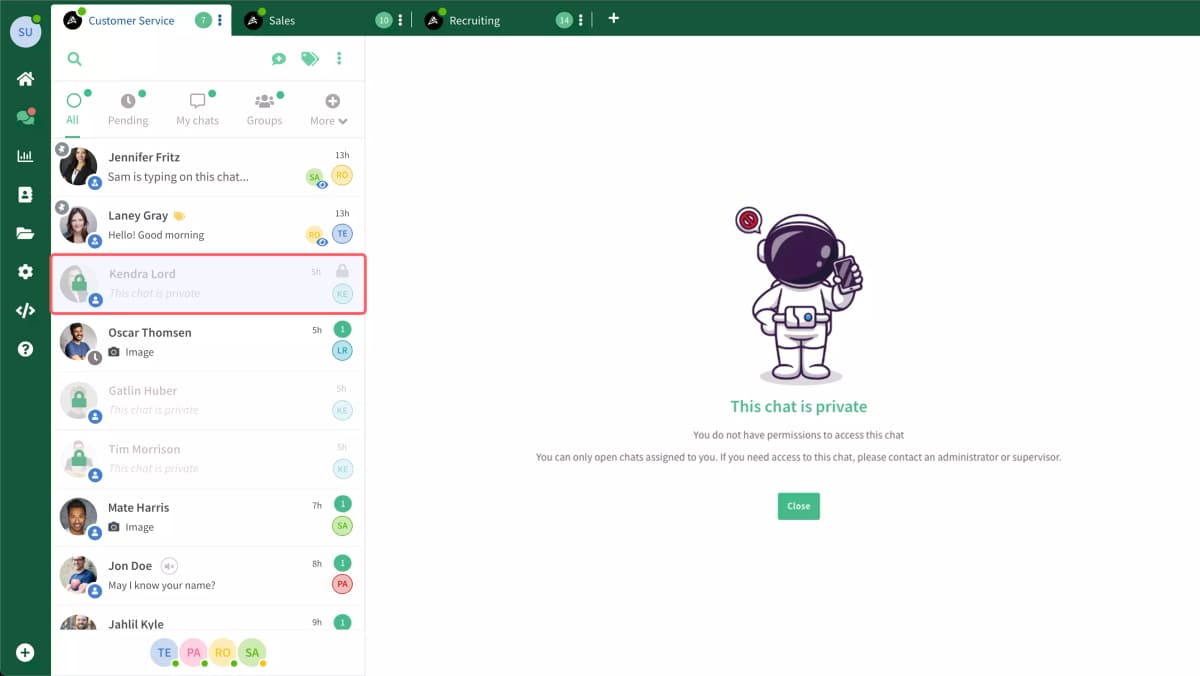
Not every agent needs access to every conversation. Set permissions so agents only see chats assigned to them, or keep full transparency — your call.
  • Private chat assignments
  • Role-based permissions
  • Department-level access control
Scale Your Team Without Chaos

Scale Your Team Without Chaos

Whether you have 2 agents or 12, the system keeps conversations organized. Add new team members in seconds — they see the shared inbox immediately.
  • Up to 12 agents per plan
  • Department routing
  • Role-based permissions
Know What's Working

Know What's Working

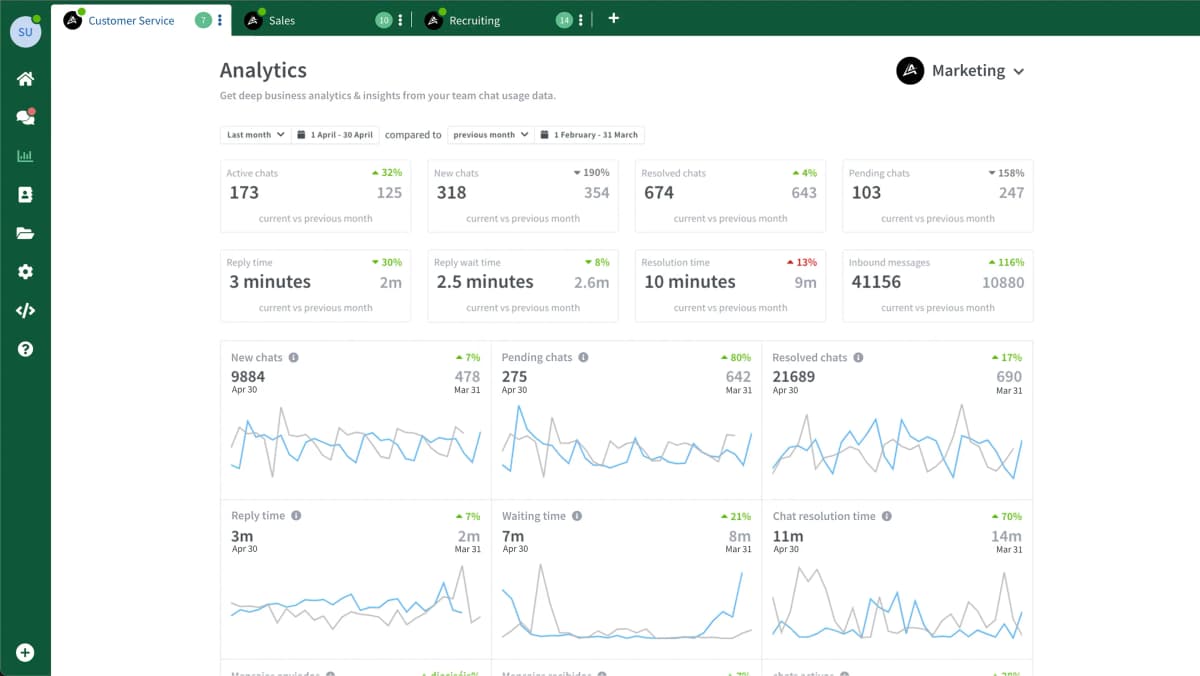
See response times, conversation volume, and team workload at a glance. Identify bottlenecks before they become problems and make decisions based on real data.

  • Response time tracking
  • Conversation volume trends
  • Agent workload overview

Built For Teams Like Yours

How different businesses use the shared inbox daily

🛒

E-commerce Support

Your support team handles order questions and returns while your sales agents answer product inquiries — all from the same WhatsApp number.

During peak hours, auto-assignment distributes incoming conversations across your full team so no customer waits.

🏥

Healthcare Clinics

Appointment scheduling, patient follow-ups, and prescription reminders. Internal notes let staff share patient context without it reaching the patient.

Built on WhatsApp's encrypted infrastructure. Consult your compliance officer for healthcare data requirements.

🏨

Hotels & Hospitality

Reservations, concierge requests, and guest services from one number. When the night concierge logs in, they see every open conversation from the day shift with full context.

Internal notes from the day team help the night shift pick up exactly where things left off.

🎓

Education & Training

Student inquiries, enrollment questions, and course support. The admissions team shares one number — students always reach someone.

Route enrollment questions to admissions and course support to the academic team automatically.

Simple, Transparent Pricing

All plans include the multi-agent shared inbox. Start with a free trial.

Starter

$29/month

Up to 5 team members

  • Multi-agent team inbox
  • Chat assignment & routing
  • Quick replies & templates
  • Mobile app (iOS & Android)
Start Free Trial
Most Popular

Business

$69/month

Up to 7 team members

  • Everything in Starter +
  • Departments
  • AI Chatbot (Flows)
  • Analytics & reports
Start Free Trial

Enterprise

$119/month

Up to 12 team members

  • Everything in Business +
  • Advanced routing
  • Custom integrations
  • SSO & advanced roles
Start Free Trial

7-day free trial on all plans

See Full Pricing

Supercharge Your Team Inbox

Combine Team Inbox with these features for even better results

AI Agents

Automate first responses with AI chatbots

Team Permissions

Granular access control per agent

Campaigns

Send personalized messages at scale

Integrations

Connect with your CRM and business tools

FAQ

Frequently Asked Questions

Everything you need to know about Team Inbox.

  • How many agents can use the same WhatsApp number?

    Each plan supports a set number of team members: Starter up to 5, Business up to 7, Enterprise up to 12. Each agent has their own login and can view and respond to conversations simultaneously. The system prevents conflicts with real-time collision detection.

  • Can agents see each other's conversations?

    Yes, by default all agents can see all conversations for full transparency. You can also set up private assignments where only the assigned agent sees certain conversations. Permissions are fully customizable.

  • How does the auto-assignment work?

    New conversations can be auto-assigned based on your rules: round-robin (equal distribution), load-based (fewer active chats get priority), or skill-based (route by topic/language). You can also have agents manually claim conversations.

  • What happens when an agent goes offline?

    Unfinished conversations are automatically reassigned to available agents. The new agent sees full history and any internal notes. Customers experience no interruption.

  • Can we have different departments or teams?

    Yes. Create departments for Sales, Support, Billing, etc. Route conversations to the right department automatically based on keywords, contact tags, or manual selection. Departments are available on Business and Enterprise plans.

  • How much does it cost?

    Starter is $29/month (up to 5 agents), Business is $69/month (up to 7 agents), and Enterprise is $119/month (up to 12 agents). All plans include the shared team inbox, auto-assignment, and collision prevention.

  • Is there a free trial?

    Yes, 7 days free on any plan. No credit card required. You can connect your WhatsApp number, invite your team, and start handling conversations immediately.

See Team Inbox in Action

Customer Support

Faster support resolution

Learn more

Real Estate

Property engagement

Learn more

Professional Services

Client management

Learn more

Education

Student communication

Learn more

Ready to Stop the Chaos?

Connect your WhatsApp number and invite your team. Setup takes 5 minutes.

Start Free TrialView Pricing
WhatsTeam

Design amazing digital experiences that create more happy in the world.

  • Product
  • Features
  • Campaigns
  • AI Agents
  • WhatsApp API
  • Integrations
  • MCP Server
  • Solutions
  • E-commerce
  • Healthcare
  • Real Estate
  • Education
  • Compare
  • Pricing
  • Free Tools
  • Link Generator
  • Button Generator
  • Number Validator
  • WABA Pricing
  • ROI Calculator
  • Company
  • Blog
  • Help Center
  • Contact
  • Referral Program
Privacy Policy·Terms of Service·Refund Policy

© 2026 WhatsTeam. All rights reserved.